Industry
CX AI Agent + Helpdesk Integration Guide (2026) - Level3AI
Harry Yu & Ming Gong

Most enterprises test a third-party AI agent inside their existing helpdesk. They route a share of traffic to the new agent, run it alongside the helpdesk's own AI, and expand the rollout once the results hold up.
That comparison is rarely fair. Helpdesks were built for human agents, and many keep their best capabilities, from structured messages to composer controls, for their own AI. A third-party agent tested there ends up speaking in plain text, losing sight of the conversation after handoff, and competing with the platform's own bot. These limitations can make an AI agent function less capable than it really is.
So before judging a third-party AI agent, look at what your helpdesk lets it do. We scored seven leading helpdesks on one question: how fairly do they support a third-party AI agent? The seven-dimension evaluation draws on our deployments with these platforms and their public documentation as of October 2026.
Seven dimensions of an AI-agent-friendly helpdesk
Dimension 1: Rich message expressiveness
Can a third-party AI agent speak in more than plain text?
Why it matters
Buttons, forms and carousels can turn a ten-message exchange into a single interaction. If the widget renders these only for the platform’s own automation, a third-party agent is forced to communicate ineffectively through plain text.
What good looks like
Text, media, files, quick replies, forms, carousels and typing indicators available through the public bot API.
Red flag
Structured messages are reserved for the helpdesk’s native AI but aren’t exposed to third-party AI agents or silently degraded to text.
Dimension 2: Turn control
Can the AI control the rhythm of the conversation?
Why it matters
Customers do not always wait for an AI to finish responding. They may send several messages in quick succession, creating fragmented turns and making the conversation harder to manage.
What good looks like
The AI agent can restrict replies to buttons or forms, lock the composer while it works, and hold or merge bursts of customer messages before responding.
Red flag
The composer remains open, free-text input is always allowed, and each message in a burst is handled separately, even when the messages are part of the same request.
Dimension 3: API openness
Can a third-party AI agent get in, and how much customer data can it access?
Why it matters
A third-party AI agent needs access to the conversation through public APIs, without extra licensing barriers or restrictions on routing. Once connected, API rate limits determine how much customer context it can retrieve, from past conversations to ticket history. If limits are too restrictive, the AI agent may not have enough information to respond effectively.
What good looks like
Public bot APIs, no extra licence fees, first-class routing for third-party AI agents, and generous, clearly documented per-app API limits.
Red flag
No public API for chat, a paid add-on required for access, or restrictive API quotas shared across all integrations.
Dimension 4: Handoff and post-handoff visibility
How well does the helpdesk preserve context during handoff, and what can the AI see afterwards?
Why it matters
When a conversation is escalated to a human, the helpdesk must route it to the right queue with the full transcript intact. But visibility should not stop at handoff. The AI agent needs real-time updates on human agent replies and ticket status changes, distinguishable from its own messages. This allows it to track how issues are resolved and act on lifecycle events, such as labelling a ticket when it is marked as solved.
What good looks like
API-based escalation into native helpdesk routing, full transcript preservation, and real-time events for individual agent replies and status changes.
Red flag
Handoff as a black hole, with only conversation-level events or polling available afterwards.
Dimension 5: Conversation continuity
Can a conversation move between channels without losing its history or context?
Why it matters
Handoffs can involve a change of channel. Urgent cases may need to stay live, while others can move to an asynchronous channel such as email. Beyond supporting the switch, the helpdesk should preserve a single conversation thread, allow routing rules to determine the appropriate channel, and merge customer identities across channels. The third-party AI agent must also retain visibility into the conversation after the switch. This evaluation focuses on chat platforms, with email considered only as a destination for conversations handed off from chat.
What good looks like
A unified thread across web chat, social messaging and email; rules that determine whether handoff stays live or moves to an asynchronous channel; merged customer identities; and continued AI visibility across the transition.
Red flag
Each channel creates a separate conversation, anonymous visitors lose their history, or the AI loses visibility after the channel switch.
Dimension 6: Configurability
Can CX teams configure when and how the AI agent operates without writing code?
Why it matters
Support teams need control over when the AI engages, what information it records, and when it intervenes. Triggers, automations, custom fields and proactive messaging allow teams to adapt these behaviours to their workflows, whether that means sending outage notices, broadcasting service updates or collecting CSAT feedback. The more teams can configure themselves, the less they depend on developers or specialist administrators to make changes.
What good looks like
Rich triggers and automations, custom ticket fields, and proactive or broadcast messaging that CX teams can configure themselves without code.
Red flag
Fixed workflows, limited custom fields, and no support for proactive messaging.
Dimension 7: AI coexistence
Can the platform’s native AI and a third-party AI agent coexist, with rules determining who handles each conversation and who gets to respond?
Why it matters
Most teams do not switch AI agents overnight. They may run the platform’s native AI alongside a third-party agent, roll out the new agent to a subset of conversations, and compare performance before expanding deployment. This requires both AIs to coexist on the same platform, with rules determining which agent handles each conversation and controls to prevent both from responding at once.
What good looks like
Both AIs can operate side by side, with rules based on channel, brand, customer segment or traffic share determining ownership. Only one AI controls the conversation at a time, control can pass between agents through an API, and the agent on standby can continue observing the conversation.
Red flag
An either-or setup that requires disabling the platform’s native AI to use a third-party agent, or a lack of controls to prevent both AIs from responding to the same customer.
Seven helpdesks for AI agent integration compared
Here are the seven helpdesks we’ve scored in depth, against the dimensions outlined above, and what stood out about each.
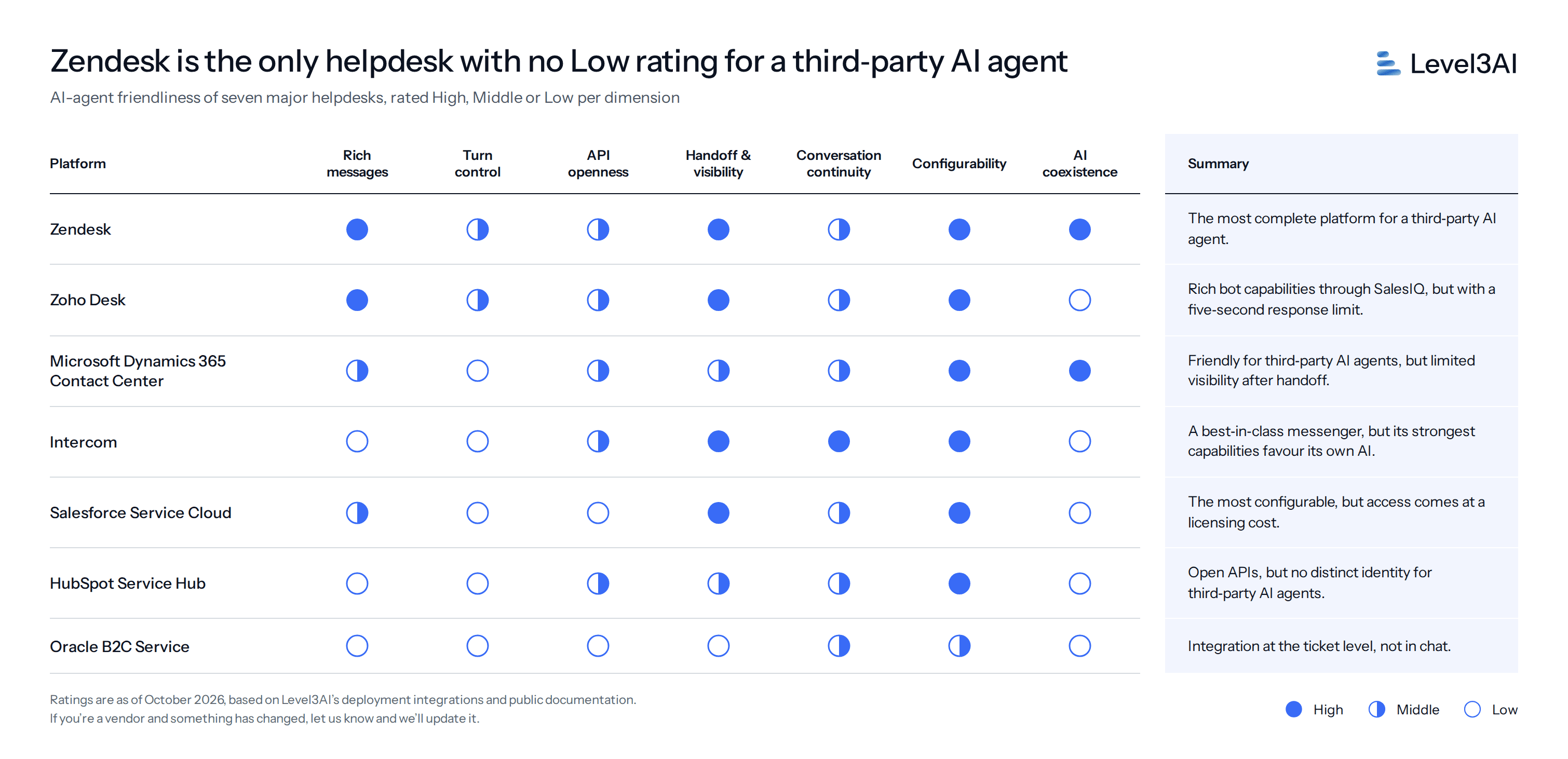
1. Zendesk: the most complete platform for a third-party AI agent in our evaluation.
Strengths
Gives third-party AI agents access to rich messaging capabilities, including forms, carousels and typing indicators.
Its Switchboard feature enables clean handover to humans for third-party AI agents.
Keeps messaging and email within one ticket, allowing AI agents to switch a live chat to email mid-conversation.
Watch-outs
API quota is shared across the whole account and with every installed app.
Composer locking (blockChatInput) only hides the text box during form and button steps, works only on the Web Widget and SDKs, and can’t hold or merge a burst of customer messages.
Web messaging and social channels such as WhatsApp can’t be switched within the same conversation.
2. Zoho Desk: rich bot capabilities through SalesIQ, but with a five-second response limit.
Strengths
Allows third-party webhook bots to use rich replies, including input cards, forms and carousels, just like Zoho’s native bots.
Provides detailed webhooks that let the AI agent continue receiving updates on human agent replies after handoff.
Publishes daily API capacity limits for each edition.
Watch-outs
Requires bot replies within five seconds, which can be restrictive for LLM-based agents. Delayed replies are supported only on web and mobile.
Runs two separate messaging stacks. Desk’s native messaging channels, including WhatsApp, limit third-party bots to text and file exchanges.
Requires SalesIQ for the bot integration, which is bundled only with Desk Enterprise, and imposes monthly caps on bot sessions.
3. Microsoft Dynamics 365 Contact Center: friendly for third-party agents, but limited visibility after handoff.
Strengths
Provides a documented bot user role that allows third-party AI agents to join routing queues as bots, rather than being treated as human agents.
Supports clean escalation to human agents, preserving routing context and providing a conversation summary.
Supports Adaptive-card forms and buttons in the live chat widget.
Offers generous, published limits for accessing customer data.
Watch-outs
Requires Azure Bot Service and premium Dynamics licences, with bot sessions counting towards licence entitlements.
The AI agent loses visibility into the conversation once a human takes over.
Does not support input locking or typing indicators, and carousel support remains in preview.
4. Intercom: the best-in-class messenger, but its strongest capabilities favour its own AI.
Strengths
Offers generous published API limits of 10,000 calls per minute per app, along with conversation search.
Allows third-party AI agents to connect without an additional licence.
Provides webhooks for teammate replies, assignment changes and conversation closures, keeping the AI agent informed after handoff.
Can follow up on unanswered replies by email and move Messenger conversations to WhatsApp natively.
Offers strong outbound messaging capabilities, including proactive chats, posts, banners and message series.
Watch-outs
Does not support forms, carousels or typing indicators for third-party AI agents.
Composer controls and structured data collection are available only through Intercom’s native Workflows, not to external bots.
Third-party AI agents have no first-class role in Workflows and must send replies through the API using an admin identity.
5. Salesforce Service Cloud: the most configurable, but access comes at a licensing cost.
Strengths
Supports carousels and buttons for third-party AI agents.
Offers fine-grained control over when the AI agent engages through Omni-Channel routing and custom fields.
Keeps messaging sessions and emails attached to the same Case, giving support teams a unified case record.
Watch-outs
Requires both Digital Engagement and the Partner Messaging add-on to connect third-party AI agents.
Chat and email follow-ups appear as separate conversation threads to the customer.
Double-text protection is available only for Salesforce’s own Agentforce, not third-party AI agents.
API quota is shared across the entire organisation and all integrations.
Offers extensive configurability, but setup and maintenance can be admin-intensive.
6. HubSpot Service Hub: open APIs, but no distinct third-party AI agent identity.
Strengths
Provides real-time webhooks for new messages, assignment changes and status updates, keeping the AI agent informed of conversation activity.
Publishes clear API rate limits for each subscription tier.
Offers multiple integration options, including a supported custom-channel route for third-party AI agents.
Watch-outs
Does not support a distinct bot identity, so replies from third-party AI agents appear under a named human user’s identity.
API-based handoff remains in beta, and WhatsApp does not support messages sent by third-party AI agents.
Webhook-based bots and custom-channel integrations require Professional-tier plans.
7. Oracle B2C Service: integration at the ticket level, not in chats.
Strengths
Converts chat interactions into incidents that human agents can follow up on by email, providing a native path from live chat to asynchronous support.
Supports flexible incident fields that the AI agent can update.
Watch-outs
Does not provide a public API for third-party AI agents to send messages through Oracle’s chat widget.
API rate limits are not publicly documented, making integration capacity difficult to assess.
After escalation, the AI agent receives no real-time updates on human agent replies or incident status changes.
Keep your helpdesk. Change the widget.
Zendesk is the only helpdesk we scored without a Low rating on any dimension. It supports every structured message type we tested for third-party agents, and its Switchboard gives teams clear control when running two AI agents side by side. Salesforce and Microsoft Dynamics 365 suit enterprises already on those suites, though both require extra licences before a third-party agent gets full capability.
You don't need to replace your helpdesk to run a fair test. Switching helpdesks means migrating ticket history, retraining your team and rebuilding integrations. Switching only the chat widget is far easier. Give the third-party agent its own widget, where it enables rich messages and turn controls, and keep the helpdesk behind it for handoff, routing and ticket records.
Every helpdesk we scored supports this setup. On most of them, including Zendesk, Salesforce, Intercom, HubSpot and Dynamics 365, the conversation stays in the agent's widget after handoff, and human agents reply from the helpdesk in real time. Where third-party widgets can't connect to the helpdesk's live chat, handoff lands on a ticket and the human agent follows up by email. With that in place, you can run the canary launch and judge the new agent on equal terms.
Want to evaluate a third-party AI agent holistically on your existing helpdesk? We can help you set up the widget, decide which conversations the new agent takes first, and agree on what success looks like before it goes live. Talk to the Level3AI team.